

Key Takeaways
- Write an engaging property description that highlights your rental’s features and benefits and incorporates keywords renters may search for.
- Take high-quality photos of your rental that show off every room and point out special amenities.
- Include all amenities your property offers to reach renters searching for specific features.
- Leverage Apartments.com Rental Tools to reach millions of renters and manage leads efficiently.
The online rental market is becoming increasingly competitive as technology revolutionizes how properties are listed and leased. Renters have more options than ever, and online rental hunting makes it easy to compare prices, amenities, and locations.
To stay competitive, it’s important to make sure your listing stands out in a crowded market. Follow these tips to optimize your Apartments.com listing and attract more renters.
In this article
- Write a Compelling Property Description
- Use High-Quality Photos
- Don’t Skip the Amenities
- Take Advantage of Apartments.com Rental Tools
- FAQs
Write a Compelling Property Description
The title and property description are your renters’ first impression, so it’s essential to craft a description that sets your property apart. Craft a description with clear, engaging details that highlight your property’s unique features and capture the attention of renters looking for a place like yours.
Focus on keywords and benefits
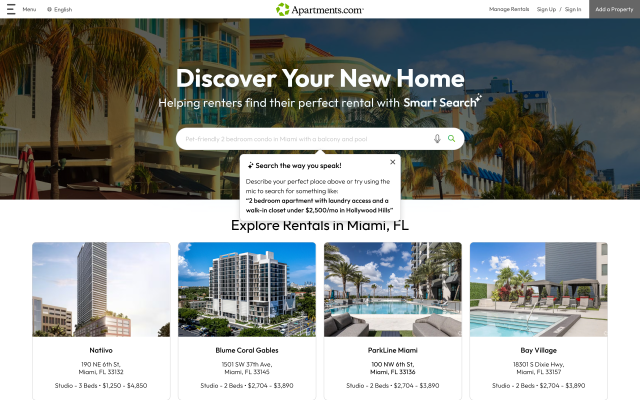
Apartments.com Ai allows renters to streamline their search using natural language, typing or speaking exactly what they're looking for. A renter might say something like "I want a 2-bedroom townhome in Miami with a pool and a waterfront view," and Apartments.com Ai will show all listings that fit the criteria. Because "waterfront view" isn't a pre-set feature on Apartments.com, Apartments.com Ai will surface listings that include the phrase in the property description, meaning that keywords matter more than ever.
Apartments.com Ai goes further than search filters. Renters can ask it to summarize a listing's highlights, answer questions about pet policies and fees, and even ask things like "What do residents think of this property?" — pulling from both your listing content and renter reviews to give instant answers. The more detail you include in your description, the better Apartments.com Ai can represent your property to prospective renters.
Think about what a renter in your area might be searching for. It might be proximity to transit, a specific neighborhood vibe, or a distinctive architectural style. Use benefits-focused phrasing like "Relax on your private balcony with waterfront views" or "Historic brownstone with character, steps from downtown" to highlight the lifestyle your rental offers. A well-written, keyword-rich description gives Apartments.com Ai the details it needs to put your rental in front of prospective tenants.
Generate a description with Apartments.com
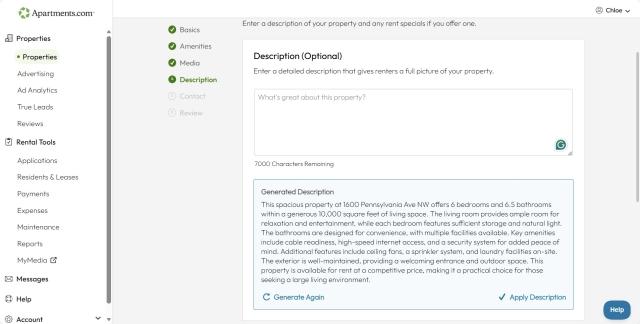
Not sure where to start with your property description? Our integrated AI feature can create a property description based on the information and photos you input. Our AI tool will scan over the details you include to create a comprehensive description for your listing.
All you have to do is edit your listing, then navigate to the property description page. Click “Generate a Description” button below the text box, then select “Apply Description” once your description is ready. Make any edits and then publish your listing.
Use High-Quality Photos
Listings with strong visuals perform better in clicks and conversions. Renters are less likely to click on photos with dimly-lit images or those with a cluttered background. You don’t have to hire a photographer; you can take high-quality photos with a smartphone.
Here are some tips to keep in mind:
- Clean and stage your rental to make it inviting
- Photograph your rental in the middle of the day for plenty of natural lighting
- Hold your camera at eye level and take photos in landscape, not portrait position
- Stand in the corner of the room and get shots of the entire space.
Consider upgrading your listing to Premium to include video walkthroughs and Matterport 3D tours. These allow renters to take a virtual tour of your property, which can help bring in more serious leads with a higher likelihood of leasing with you.
Highlight available features
The photos in your listing are the main event, so make sure you’re showing off your rental’s best features. Include clear photos that show appliances and use captions to emphasize key details. Include images of the yard, the neighborhood, or community amenities like grill areas and dog parks.
Think like a renter when taking photos of your property—what would you want to see?
Don’t Skip the Amenities
Renters often filter their searches by specific amenities, so it’s important to include all amenities your property offers. Apartments.com provides a detailed amenities checklist to ensure nothing is overlooked. Practical amenities like in-unit laundry, air conditioning, and parking are most searched, but amenities like fireplaces, hardwood floors, and balconies often make a difference in attracting leads.
Prioritize what renters value most
Address common renter concerns by including details about pet policies, parking, utilities, and high-speed internet. Clearly outline what’s included in the rent and any optional add-ons to reduce repetitive inquiries.
Take Advantage of Apartments.com Rental Tools
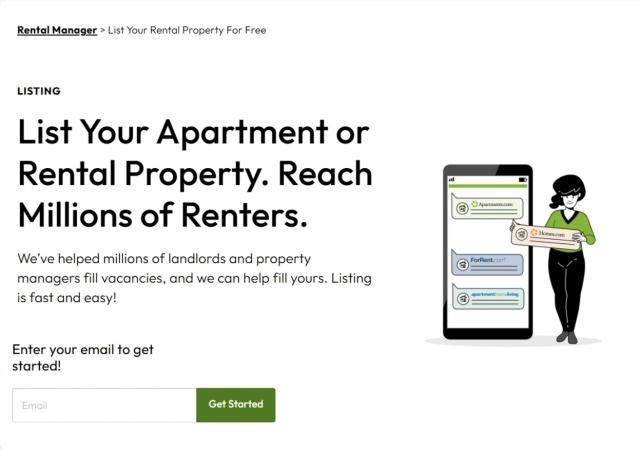
List your rental property for free on Apartments.com and utilize our landlord resources for more visibility, high-quality leads, and faster lease-ups. With built-in features like Messages, tenant screening, and online rent collection, managing your leads has never been easier!
Enable lead-driving features
Activating the “Apply Now” button and availability calendar conveys urgency and encourages prospective renters to take action.
Keep your listing fresh
Listings updated regularly perform better in search algorithms. Making minor updates every two weeks, like refreshing the description, adding new photos, or adjusting the availability date, can make a big impact.
Consider Premium placement
Premium listings rank higher in search results, boosting visibility, especially during slow seasons or in competitive markets, and upgrading to Premium allows you to add videos and Matterport 3D tours to your listing.
Listing enhancement is essential for thriving in a competitive rental market. Clear, compelling descriptions and high-quality visuals showcase your property’s unique features and benefits, attracting the right renters. Using tools like the Apartments.com Rental Tools suite can streamline the process and set your rental up for success. Ready to get started? Apartments.com Rental Tools is here to help with free and Premium listings for landlords.
This article was originally published on July 6, 2025, by Sharon Livsey and has been updated.
FAQs
How can I make my rental listing stand out in a competitive market?
Focus on creating an engaging description that highlights your property’s unique features and benefits. If coming up with something unique about your property is a challenge, consider the property’s proximity to local businesses, public transit, or parks. If you’ve done any upgrades or renovations, describe the changes you made and how it enhanced your property.
What tools does Apartments.com offer to help attract renters?
Features such as 3D Matterport tours, the “apply now” option, and Premium listing placement are just a few of what landlords have at their disposal to help maintain a competitive edge in the rental market.
Why are amenities and keywords so important to include in my listing?
Amenities are a key factor renters filter their searches by, making them essential for drawing in the right audience. Features like in-unit laundry, hardwood flooring, and a yard can set your property apart from your competition. Including these details upfront reduces inquiries about missing information and attracts renters whose needs align with your property.
Including keywords helps your listing show up in searches that include a specific keyword in the search criteria. With the new AI Smart Search feature on Apartments.com, renters can list everything they want in a rental, and our AI Smart Search tool will show only the listings that check every box. This means that renters are encouraged to search by keyword, so think like a renter and highlight features a renter in your area might be looking for.


